

Skip to content
  • Customer Support
Acros logo
  • One Control Center for Every Scenario

    Arcos connects your people, work, and systems so you can execute well under any conditions.

    • Solutions Overview

    Resource Management

    Crew Callout Assemble qualified crews in minutes with automated callouts. Crew & Event Logistics Coordinate lodging, meals, and crew support at scale. Mutual Aid Management Onboard and manage mutual aid crews in one system. Non-Native Crew Management Equip contractors with mobile tools from day one. Crew & Contractor Management Standardize execution across all crews and contractors. Crew Scheduling & Shift Fill Fill open trips and shifts with automated rule compliance.

    ONCOMMAND SUITE OVERVIEW

    Menu Suite Image
    Learn how ARCOS puts teams in control with unified crew, process, and asset management. Explore the Full Suite

    Work Execution

    Asset Inspection & Maintenance Digitize inspections and maintenance with digital workflows and GIS integration. Work Order Tracking Track job progress with real-time field data capture. Wildfire Mitigation Target the work that matters most for safety and reliability. Vegetation Management Plan, dispatch, and report on vegetation programs. Damage Assessment & Repair Accelerate restoration with real-time field intelligence.

    ONCOMMAND SUITE OVERVIEW

    Menu Suite Image
    Learn how ARCOS puts teams in control with unified crew, process, and asset management. Explore the Full Suite

    Reporting & Analytics

    Regulatory Reporting Generate comprehensive reports for regulators and FEMA. Compliance Enforce labor rules and maintain audit-ready records. Real-time Storm Restoration Reporting Gain real-time visibility into crew status and progress. Closeout & Cost Recovery Accelerate event closeout with verified cost documentation. Crew Expense Reporting Capture verified crew time and expenses automatically.

    ONCOMMAND SUITE OVERVIEW

    Menu Suite Image
    Learn how ARCOS puts teams in control with unified crew, process, and asset management. Explore the Full Suite

    Community Engagement

    Outage Alerts Automate outage and restoration alerts to reduce call volume. Billing Service Alerts Improve on-time payments with billing and past due reminders. Conservation Campaigns Reduce peak demand with conservation alerts.

    ONCOMMAND SUITE OVERVIEW

    Menu suite image
    Learn how ARCOS puts teams in control with unified crew, process, and asset management. Explore the Full Suite
    icon

    Trusted by Fortune 150 energy companies

    icon (1)

    Ranked on the Inc. 5000 list seven times

    vector

    Focused on secure, reliable operations

    Close

  • One Control Center for Every Scenario

    Arcos connects your people, work, and systems so you can execute well under any conditions.

    • Integrations

    Our Products

    Callout Mobilize compliant crews in minutes with rules-driven callouts. Crew Manager Track every crew from activation to closeout in one system. Assess & Restore Execute blue and grey sky work in a single mobile app. Clearion Plan, execute, and document vegetation and inspection work. TextPower Send urgent alerts that reach crews and customers fast. Ascend Automate flight crew staffing to cut cancellations. RosterApps Fill ground crew shifts faster with automated scheduling.

    PRODUCT UPDATES

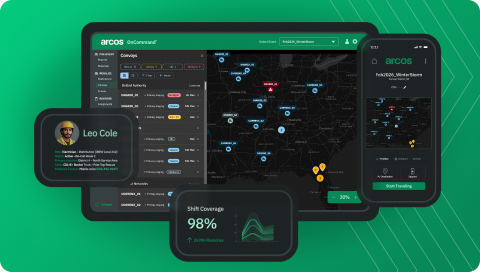
    Track Crews from Callout to Closeout SEPT 23, 2025 ARCOS is excited to announce the release of Convoy Tracking, a powerful new capability within Crew Manager that gives utilities unprecedented visibility into mutual aid crews as they travel to support restoration efforts.
    Improve Connections with Field Crews JULY 28 2025 We’re excited to share two new feature sets for our Crew Manager product that will help utilities better communicate and collaborate with crews in the fiel
    Learn More
    icon

    Trusted by Fortune 150 energy companies

    icon (1)

    Ranked on the Inc. 5000 list seven times

    vector

    Focused on secure, reliable operations

    Close

  • One Control Center for Every Scenario

    Arcos connects your people, work, and systems so you can execute well under any conditions.

    Industries OVERVIEW

    Electric Mobilize crews, restore power faster, and document every event. Gas Resolve leaks quickly and safely with compliant crews. Water Respond to breaks quickly and keep service flowing. Critical Infrastructure Improve outcomes with a single operational control center. Airlines Fill staffing gaps in minutes to avoid cancellations.

    ONCOMMAND SUITE OVERVIEW

    Menu Suite Image
    Learn how ARCOS puts teams in control with unified crew, process, and asset management. Explore the Full Suite
    icon

    Trusted by Fortune 150 energy companies

    icon (1)

    Ranked on the Inc. 5000 list seven times

    vector

    Focused on secure, reliable operations

    Close

  • One Control Center for Every Scenario

    Arcos connects your people, work, and systems so you can execute well under any conditions.

    • Partner Network

    RESOURCES

    Insights Blog Expert perspectives on utility operations and workforce trends. White Papers Deep dives on reliability, risk reduction, and digital transformation. Success Stories How utilities achieve reliability gains and measurable ROI. Resource Library Discover all the latest and greatest content from Arcos.

    EVENTS

    Events Connect with Arcos and peers at industry conferences. Webinars Live and on-demand sessions on best practices and trends.

    SUPPORT

    Support & Help Center Find technical documentation, user guides, and resources. Contact Us Reach the Arcos team with questions or to schedule a workshop.
    icon

    Trusted by Fortune 150 energy companies

    icon (1)

    Ranked on the Inc. 5000 list seven times

    vector

    Focused on secure, reliable operations

    Close

  • One Control Center for Every Scenario

    Arcos connects your people, work, and systems so you can execute well under any conditions.

    • Contact Us

    ABOUT US

    Company Overview Learn more about the Arcos mission. Leadership Meet the team building the future of utility operations. ESG Policy Our commitment to environmental and social responsibility. Careers Join a team that powers critical infrastructure. Customer Steering Committee Shape the Arcos roadmap alongside fellow utility leaders. Our Investors The partners supporting Arcos growth and innovation.

    ONCOMMAND SUITE OVERVIEW

    Menu Suite Image
    Learn how ARCOS puts teams in control with unified crew, process, and asset management. Explore the Full Suite

    FEATURED NEWS

    press-release-featured-image-template
    ARCOS Brings Convoy Tracking to Crew Manager Arcos announced today the addition of convoy tracking to Crew Manager, its comprehensive solution for assigning, tracking and managing crews.
    press-release-hb-helmbsriscoe
    ARCOS Introduces Native Two-way Crew Communication Arcos announced new enhancements to Crew Manager, its comprehensive solution for assigning, tracking and managing crews.
    press-release-featured-image-template
    Arcos Announces New Strategic Growth Investment from Bain Capital Arcos’ AI-enabled software solutions are leveraged by customers from Fortune 150 energy companies to municipal utilities to power and transform their field management operations.
    press-release-featured-image-template
    Arcos Launches Partner Network to Drive Collaboration and Innovation in Utility Workforce Management The program creates a formal framework for partnerships, which will benefit customers seeking guidance on complementing and expanding their use of Arcos
    See all News
    icon

    Trusted by Fortune 150 energy companies

    icon (1)

    Ranked on the Inc. 5000 list seven times

    vector

    Focused on secure, reliable operations

    Close

Sign In Schedule a Workshop
Acros logo
Sign In Schedule a Workshop

Resource Management

  • Crew Callout Assemble qualified crews in minutes with automated callouts.
  • Crew & Event Logistics Coordinate lodging, meals, and crew support at scale.
  • Mutual Aid Management Onboard and manage mutual aid crews in one system.
  • Non-Native Crew Management Equip contractors with mobile tools from day one.
  • Crew & Contractor Management Standardize execution across all crews and contractors.
  • Crew Scheduling & Shift Fill Fill open trips and shifts with automated rule compliance.

ONCOMMAND SUITE OVERVIEW

Menu Suite Image
Learn how ARCOS puts teams in control with unified crew, process, and asset management. Explore the Full Suite

Work Execution

  • Asset Inspection & Maintenance Digitize inspections and maintenance with digital workflows and GIS integration.
  • Work Order Tracking Track job progress with real-time field data capture.
  • Wildfire Mitigation Target the work that matters most for safety and reliability.
  • Vegetation Management Plan, dispatch, and report on vegetation programs.
  • Damage Assessment & Repair Accelerate restoration with real-time field intelligence.

ONCOMMAND SUITE OVERVIEW

Menu Suite Image
Learn how ARCOS puts teams in control with unified crew, process, and asset management. Explore the Full Suite

Reporting & Analytics

  • Regulatory Reporting Generate comprehensive reports for regulators and FEMA.
  • Compliance Enforce labor rules and maintain audit-ready records.
  • Real-time Storm Restoration Reporting Gain real-time visibility into crew status and progress.
  • Closeout & Cost Recovery Accelerate event closeout with verified cost documentation.
  • Crew Expense Reporting Capture verified crew time and expenses automatically.

ONCOMMAND SUITE OVERVIEW

Menu Suite Image
Learn how ARCOS puts teams in control with unified crew, process, and asset management. Explore the Full Suite

Community Engagement

  • Outage Alerts Automate outage and restoration alerts to reduce call volume.
  • Billing Service Alerts Improve on-time payments with billing and past due reminders.
  • Conservation Campaigns Reduce peak demand with conservation alerts.

ONCOMMAND SUITE OVERVIEW

Menu suite image
Learn how ARCOS puts teams in control with unified crew, process, and asset management. Explore the Full Suite
Solutions Overview
Sign In Schedule a Workshop

Our Products

  • Callout Mobilize compliant crews in minutes with rules-driven callouts.
  • Crew Manager Track every crew from activation to closeout in one system.
  • Assess & Restore Execute blue and grey sky work in a single mobile app.
  • Clearion Plan, execute, and document vegetation and inspection work.
  • TextPower Send urgent alerts that reach crews and customers fast.
  • Ascend Automate flight crew staffing to cut cancellations.
  • RosterApps Fill ground crew shifts faster with automated scheduling.

PRODUCT UPDATES

Track Crews from Callout to Closeout SEPT 23, 2025 ARCOS is excited to announce the release of Convoy Tracking, a powerful new capability within Crew Manager that gives utilities unprecedented visibility into mutual aid crews as they travel to support restoration efforts.
Improve Connections with Field Crews JULY 28 2025 We’re excited to share two new feature sets for our Crew Manager product that will help utilities better communicate and collaborate with crews in the fiel
Learn More
Integrations
Sign In Schedule a Workshop

Industries OVERVIEW

  • Electric Mobilize crews, restore power faster, and document every event.
  • Gas Resolve leaks quickly and safely with compliant crews.
  • Water Respond to breaks quickly and keep service flowing.
  • Critical Infrastructure Improve outcomes with a single operational control center.
  • Airlines Fill staffing gaps in minutes to avoid cancellations.

ONCOMMAND SUITE OVERVIEW

Menu Suite Image
Learn how ARCOS puts teams in control with unified crew, process, and asset management. Explore the Full Suite
Sign In Schedule a Workshop

RESOURCES

  • Insights Blog Expert perspectives on utility operations and workforce trends.
  • White Papers Deep dives on reliability, risk reduction, and digital transformation.
  • Success Stories How utilities achieve reliability gains and measurable ROI.
  • Resource Library Discover all the latest and greatest content from Arcos.

EVENTS

  • Events Connect with Arcos and peers at industry conferences.
  • Webinars Live and on-demand sessions on best practices and trends.

SUPPORT

  • Support & Help Center Find technical documentation, user guides, and resources.
  • Contact Us Reach the Arcos team with questions or to schedule a workshop.
Partner Network ROI Calculator
Sign In Schedule a Workshop

ABOUT US

  • Company Overview Learn more about the Arcos mission.
  • Leadership Meet the team building the future of utility operations.
  • ESG Policy Our commitment to environmental and social responsibility.
  • Careers Join a team that powers critical infrastructure.
  • Customer Steering Committee Shape the Arcos roadmap alongside fellow utility leaders.
  • Our Investors The partners supporting Arcos growth and innovation.

ONCOMMAND SUITE OVERVIEW

Menu Suite Image
Learn how ARCOS puts teams in control with unified crew, process, and asset management. Explore the Full Suite

FEATURED NEWS

press-release-featured-image-template
ARCOS Brings Convoy Tracking to Crew Manager Arcos announced today the addition of convoy tracking to Crew Manager, its comprehensive solution for assigning, tracking and managing crews.
press-release-hb-helmbsriscoe
ARCOS Introduces Native Two-way Crew Communication Arcos announced new enhancements to Crew Manager, its comprehensive solution for assigning, tracking and managing crews.
press-release-featured-image-template
Arcos Announces New Strategic Growth Investment from Bain Capital Arcos’ AI-enabled software solutions are leveraged by customers from Fortune 150 energy companies to municipal utilities to power and transform their field management operations.
press-release-featured-image-template
Arcos Launches Partner Network to Drive Collaboration and Innovation in Utility Workforce Management The program creates a formal framework for partnerships, which will benefit customers seeking guidance on complementing and expanding their use of Arcos
See all News
Contact Us
Sign In Schedule a Workshop

Search

  • There are no suggestions because the search field is empty.
Critical Infrastructure

MWM Software Can Manage Your Staff's Workload Distribution 

Struggling with uneven task distribution? Learn expert tips to manage your staff's workload efficiently, ensuring a balanced and productive team every day.

Posted by 

ARCOS


|


October 19, 2020

Share to

Delegating work can become an overwhelming problem. Workloads are ballooning while only a finite workforce, narrow job completion time frames, and a restricted number of necessary equipment are available. Mix in the health and safety rules and regulations COVID-19 has added to the delegation process, and managers can lose productivity and focus fast. It’s a problem over-shadowing every industry – including utilities and critical infrastructure organizations. How can leaders effectively balance and manage the ever-increasing workload and keep the limited number of crews and teams healthy, less stressed, and ready to accomplish the multiple tasks at hand?

Enter Mobile Workforce Management or MWM

Workload management offers a solution for all the above and more. It’s not just a tip to manage your staff’s workload distribution—it’s a must. Without effective workload management practices in place, you’ll experience lower employee satisfaction, higher employee turnover, and decreased performance from staff across the board.

What Is Mobile Workforce Management?

Workforce management is the deliberate practice of efficiently distributing work throughout a team. It enables project managers to match employees to work and jobs coming in, so performance and productivity levels are never compromised. It allows team members to deliver work of higher quality, to complete work tickets faster, and to be able to move on to the next new project with precision and full visibility of all resources available. Workload management is a strategic productivity enhancement to the skillset of a workforce.

Why do you need Mobile Workforce Management Software?

As many as 8 in 10 employees experience “burn out,” or physical and mental exhaustion as a result of work-related stress, and workload plays a significant role in employee stress levels. Burnout can lead to real health concerns, such as:
  • Fatigue
  • Mood changes
  • Insomnia
  • Weight gain
  • High blood pressure
  • Decreased immune function
  • Alcohol or other substance abuse
According to research done by the American Psychological Association, employees with a poor workload balance are over 60% more likely to take sick days—even if they aren’t sick—and organizations that leave employees with heavy workloads also generally see their healthcare costs more than double. Worse, those same employees are nearly three times more likely to quit and are likely to perform poorly before they do. About 85% of employees say they are less engaged at work when they are stressed. In short, not having adequate workload management practices will cost you in more ways than one!

How Do You Manage a Heavy Workload Effectively?

5 Tips & Tricks to Help Manage Your Staff’s Workload Distribution

The following tips and tricks can help any company use a mobile workforce management (MWM) solution, ensuring that more jobs are finished quickly without burnout or resource management complications.

Pre-Planning and Planning Again

Efficiency isn’t random or a magical thing that mystically happens. It’s the product delivered from a mindful application of pre-planning and planning efforts. To accomplish anything, an organization must have a strong workforce and workload management plan first with the foresight that it is malleable and able to change as situations warrant. A project can only be victorious based on the latest facts, schedules, and resource allocations. Effective work distribution cannot happen any other way. Plans must include an achievable goal, a list of team players available to work, including their skill sets and strengths, and the tools available that match the work that needs accomplishing. Running through scenarios and reviewing past jobs is essential in pre-making plans, so you already have something in place to face whatever the world wants to throw at you. Make sure you schedule time to strategize, so delegating is already decided and can be put into motion at a moment’s notice. Then, be ready to pivot. Nothing stays the same forever. Always be planning, and you will stay three steps ahead.

Be Fair and Impartial

There’s no room to play favorites when it comes to your team’s workload distribution—unless you’re looking to lose staff. Develop a fair, unbiased system right from the start for scheduling, project types, overtime, and time-off requests. Get to know your team’s strengths, weaknesses, likes, and dislikes, and plan your workload around that information as much as possible. Your workload plan will also be better received if you involve your employees in the planning process. Whether that’s an occasional team meeting or integrating a request system into your project management tools, it will make your staff feel like their opinion matters. That alone can help relieve employee stress and encourage staff loyalty. That said, you can’t make everyone happy, and trying to do so could lead to manager burnout. Do your best to respect employee requests and needs, but have clear guidelines on what can and can’t be done.

Know the Analytics to Prioritize

If bad data is coming in, you’ll only have bad data going out. Garbage in, garbage out, right? One of the most critical aspects of workload management is to be sure you are getting the most up-to-date and reliable information possible. You cannot set you and your team up for success unless your analytics are top-notch and accurate, including field reporting, team rosters, itineraries, crew schedules, work and job tickets, equipment inventories, and in this day of on-going pandemics, PTO and quarantine contact tracing lists. Each of these analytics can help prioritize the workload and reveal the exact team members you need. “When” is never a question as the analytics will show arrival and estimated completion times and alert you of any bandwidth issues before they happen. Prioritizing workloads and managing tasks can be done when all the numbers fall into place before you in one centralized system.

Use a Mobile Workforce Management Solution

So, our last tip had a lot of moving parts. How can a project manager keep track of that many data points while being crushed by a continuous torrent of work orders rushing in? Get started with a workload management solution like ARCOS Mobile Workbench. Our MWM software acts as one central source of truth. It’s able to give you a complete view of what’s going on with every job, work ticket, and crew team member and can tie into your existing OMS, WMS, and other business systems – precisely what you should look for in a mobile workforce management solution. You also need a system that can record, track, and retain historical data. ARCOS Mobile Workbench does that too, making reviewing, planning, and reporting as easy as a few clicks of a mouse. Saving time, avoiding conflicts, and having the agility to move fast on projects is essential. When you don’t have to use multiple apps, reach for a spreadsheet, or decipher a whiteboard, you can react quickly. A workforce and workload management tool gives you that proficiency with full visibility, and an added layer of team confidence that brings crews, their work, and their resources all together in a singular system.

Balance Your Approach

Workload distribution and workforce management tools have come a long way. Creating a better process using the latest technology can lead to better communication, collaboration, allocation, and real-time task insight. It can improve morale and get more out of teams on a work site. It can provide a holistic view of all resources available and a historical record which informs future mobile work management planning and staging. It provides a balanced approach that puts every team member on the same solid ground as they tackle a never-ending pile of work. Find out more about how ARCOS solutions can help by checking out our recent Storm Cost Recovery & FEMA Reimbursement on-demand webinar.

People Also Ask, What Are MWM Tools?

Mobile workforce management tools provide software and other mechanisms to implement effective workload management practices in a range of ways. As an example, the ARCOS Mobile Workbench allows you to, among other things:
  • Monitor how many employees are on the clock, who they are, and where they are in the field
  • Assign work orders to specific employees and track their progress
  • Track the progress of each project and create reports before, after, or during completion
  • Generate automatic municipal or state permitting applications
  • Automate service request quotes and other tasks to reduce employee workload
  • View material and equipment assessment information from anywhere, anytime
  • Review data from past work orders to determine what worked and what didn’t
These tools allow you to do more in less time without overloading your employees. You’ll cut costs and keep your staff happier.

How Do You Manage a Workforce Plan?

Workload management will look different for every organization, but here are some common steps in the workload planning process: Evaluate your resource availability in terms of staff, their skills, and equipment. It can help to complete this process concurrently with employee evaluations and end-of-year asset evaluation to reduce the workload involved.

Estimate your workload and build a list of typical day-to-day tasks.

Break this list down into the steps required for each task, estimated work hours involved, and prioritize their importance and due dates. Allocate those tasks evenly among your staff. You can split tasks into subtasks, if need be, but remember to be fair, impartial, and include your employees in the decision-making process at some point. Establish a system to monitor performance and employee satisfaction and adjust your workload plan as needed. Your work isn’t done once you’ve created a work plan. You also need to monitor it not only to ensure that it’s being followed but also to make sure that it’s working. A poor workload plan is no better than no plan at all! Alternatively, you can let a team workflow management tool like the ARCOS Mobile Workbench handle most of these steps for you! Our management software streamlines the workload planning process, making it easy to ensure everyone is doing their fair share of the work.

How do you keep track of employee workload?

Tracking is another area where workload management tools really come in handy. Otherwise, you’ll need to create a virtual or paper-based tracking system that notes employee work hours, job descriptions, performance, work order notes, and more. It can quickly become overwhelming. With workload management software, you can automate a good deal of this process and roll many operational tasks into one convenient, mobile dashboard in the process.

How Can I Help Employees Manage Their Workload?

Like many aspects of business, workload management rests just as much on your employees as it does on management. Couple your workload plan with time management training and encourage your staff to:

Avoid multitasking:

Once upon a time, multitasking was considered an effective way to maximize your time, but often it’s simply a distraction and leads to more mistakes. Your employees will finish faster with better results if they focus on one task at a time. You can also help facilitate this habit by assigning a workload that doesn’t force employees to multitask!

Practice self-care:

Part of having a good workload plan is ensuring your staff can maintain a proper work-life balance that allows them time for self-care. Encourage them to take advantage of that time. Employees who spend all their time off tackling household chores and checking other items off their to-do lists are more likely to experience burnout.

Communicate:

Your staff should feel comfortable voicing concerns about their workload with you and upper management. They are more likely to do that if you establish clear lines of communication and provide them an easy avenue to do so. You can also offer easy ways to request time off via an automated virtual platform like the ARCOS Mobile Workbench.

Work as a team:

While not all fieldwork involves an entire team on-site, you can still encourage your team members to work as a team. Provide them the proper tools and staff to simplify their work and consider planning team-building exercises and other opportunities to share knowledge and get to know one another.

How Can I Tell If My Workload Plan Isn’t Working?

Remember to check in on your employees often and learn to spot the signs of stress. Your employees will be the biggest gauge of how well your team’s workload plan is working. Employees experiencing burnout may:
  • Alienate themselves from co-workers
  • Seem short-tempered or moody
  • Look tired and take less care to maintain a professional appearance
  • Let their work performance slide
  • Make more mistakes
  • Call in sick or come in late often
If you notice any of the above, it’s time to schedule a team meeting and re-evaluate your workload plan, especially if you have more than one employee showing signs of work-related stress. Contact an ARCOS expert for more details about how our solutions can help relieve the pressure and fix workload management issues.

Related Blog Post

Blog

Bridging the Gap in Utility Emergency Response
Read More

Blog

Utility Workforce Agility: Navigating Increasing Contractor Complexity
Read More

Gas

Reducing Vegetation Risk, One Span At A Time
Read More

Trusted by Leading Utilities Across North America

Explore the Arcos OnCommand Suite Schedule a Workshop

Scheduling & Overtime

Storm Response

Crew Callout

Field Visibility

Mobile Work

Compliance & Reporting

MUTUAL AID

Scheduling & Overtime

Storm Response

Crew Callout

Field Visibility

Mobile Work

Compliance & Reporting

MUTUAL AID

footer-divider

Trusted by Leading Utilities Across North America

Delivering proven solutions in workforce and resource management

Get the 15‑min Walkthrough
Arcos logo white

Helping utilities restore faster and serve communities better

  • Solutions
    • Resource Management
    • Work Execution
    • Reporting & Analytics
    • Community Engagement
  • Products
    • Callout
    • Crew Manager
    • Assess & Restore
    • Clearion
    • TextPower
    • Ascend
    • RosterApps
    • Integrations
  • Industries
    • Electric
    • Gas
    • Water
    • Critical Infrastructure
    • Airlines
  • Resources
    • Insights Blog
    • Events
    • White Papers
    • Webinars
    • Success Stories
    • Our Partners
  • About
    • Leadership
    • ESG Policy
    • Careers
    • Customer Steering Committee
    • Contact Us
    • Newsroom
  • CONTACT US
    • 614.739.9870
    • Talk to an expert
    • 8800 Lyra Drive,
Suite 200
Columbus, OH 43240

Follow us

Arcos LinkedIn social icon

Get the app

App Store badge green color
Google Play Store badge green color

© 2026 Arcos LLC. All Rights Reserved.

Privacy Policy Cookies Policy Terms & Conditions Accessibility Statement